Loughborough Online Reading List System
Archive for November, 2009
More ACL fun
30 Nov 2009
After fiddling with ACLs for the last few weeks we had to reload the access_control_list table with the new style ACLs. Last week I’d written a “fixacls” perl script to do this and left it running. It was still running a week later when I came in this morning, and was only about half way through the >88K SU’s we’ve got. A quick back of the envelope calculation showed that with the new ACL format we’d be looking at north of 2 million ACLs for this many SUs.
So, time to find a way of speeding it up. I decided to try something I’d seen phpBB do: write all the imports for a table into a single SQL INSERT statement. This should then be able to read all data in and generate the index entries all in one go, which should be much faster than doing it row by row in individual SQL statements.
The ACL generation script took just over 6 hours (I didn’t time it exactly unfortunately, but it was ticking along at about 300000 ACLs per hour, with just over 2 million ACLs in total for the 88882 SUs we’ve got).
Reading this into the database was actually quite quick:
mysql> source /home/cojpk/LUMP/trunk/ImportScripts/acl.sql
Query OK, 2266017 rows affected (51.98 sec)
Records: 2266017 Duplicates: 0 Warnings: 0
Well, it was once I’d upped the max_packet_size in /etc/my.cnf to 100MB from 1MB! Looking promising now. A similar technique might be useful for a revamp of the LORLS import script – certainly the ACL fixup can now be run as part of that to cut down on time required. Still need to tweak the fixacls script to deal with LORLS reading lists that were marked as unpublished, but that should be a quick and easy hack.
Reading Lists: Friend or Foe?
20 Nov 2009
The title above refers to a half day WESLINK event on reading lists which I was lucky enough to be invited to on Wednesday. The event was hosted at Keele (big shout out to my SatNav for finding the place). It started with a buffet lunch, followed by presentations from three institutions on how they currently manage their reading/resource lists:
- Spreadsheets at Keele University
- Talis List at the University of Birmingham
- LORLS at Loughborough University (by yours truly).
The day finished with a group discussion. One of the main things I picked up from this was the differences in approach as to who edits the reading lists. Some sites were strongly in favour of the library being responsible to all editing of online reading lists. At Loughborough we’ve always been keen for academics to edit the lists themselves, after all they are the intellectual creators of the lists.
It also seems very inefficient for the library to re-enter information into a system when the academics are most likely already doing this (even if they are just using Word). Ideally if the information can be entered just once, by the academic into the online system, this should free up time for all concerned: library staff not acting as data entry clerks and academics not having to check others interpretation of their work.
However in order for this to happen the system needs to be as easy as possible for the academic to use. This is why as part of our LORLS we’ve been developing BibGrab.
Access Control Lists
09 Nov 2009
Been head scratching about access control lists, which have proved more complicated than originally anticipated. The trouble comes from working out how to do inheritence (so that we don’t need thousands of similar ACLs differing only in their SUID) and also how to set the initial ACLs for a SU that has been newly created.
Current thinking is as follows:
The existing access_control_list table will be left as is, but will be used in a slightly different way. To find out if a user has rights to something, we’ll first search through the table for all rows that contain a user group that the user is in that has the maximum priority. The guest usergroup has a priority of 0, general registered users 1, module support staff 170, module tutors 180, module library assistance 190, module librarians 200 and sysadmins 255.
If no rows match, game over, the user doesn’t have any sort of access. If rows are returned, we then look at the SUID field, and potentially the DTG_ID field if we’ve had one specified. Rows with no SUID or DTG_ID field are the lowest prescidence, then ones with just a SUID provided, then ones with SUID and DTIG_ID at the top. At this point we can then look at the view and edit fields to see what folk are allowed to do with them.
We might also need to allow folk to edit ACLs. We’ll let them edit ACLs of any group with a lower priority than the one that they are in and that mentions a SUID and/or DTG_ID that they have edit rights to. The only exception is Sysadmins – we can edit our own ACLs and can also edit ACLs that have a NULL (ie wildcard) SUID or DTG_ID. We will also disallow new ACLs to be created that have the same <usergroup_id, su_id, dtg_id> triple so that we don’t have two rules with different edit/view options at the end of the access validation algorithm.
When a new SU is created, we’ll need to add some rights to it. These initial rights will have user groups inherited from the parent SU, but this is where things get tricky: as we’ve discovered we can’t just copy the ACLs, because child SUs will in general be of a different SUT than their parents.
To get round this we’ve proposed two new tables. The first of these is “acl_defaults”. This links user group priorities with SUT_IDs, DTG_IDs and default “view” and “edit” settings. The second table is less important and more for UI “gloss” when creating/editing default ACLs – it is merely a list of priorities (as its ID field) and a name – so that we know that (for example) priority 170 is assigned to user groups for Support Staff.
The process when a new SU is created is as follows: for each usergroup that has an ACL in the parent SU take that usergroup’s priority field and then look up the row(s) in the acl_defaults table that match that combined with the SUT_ID for the new SU. These rows are then used to create new rows in the access_control_list table with the specific SUID for the new SU filled in (and if specified in acl_defaults, the value for DTG_ID as well).
Showing Current Availability Of Items
04 Nov 2009
I have been working on getting CLUMP to pull information out of our LMS (Aleph) so that users can easily see which books from reading lists are currently available in the Library. The result of the work is shown in the following screen shot.
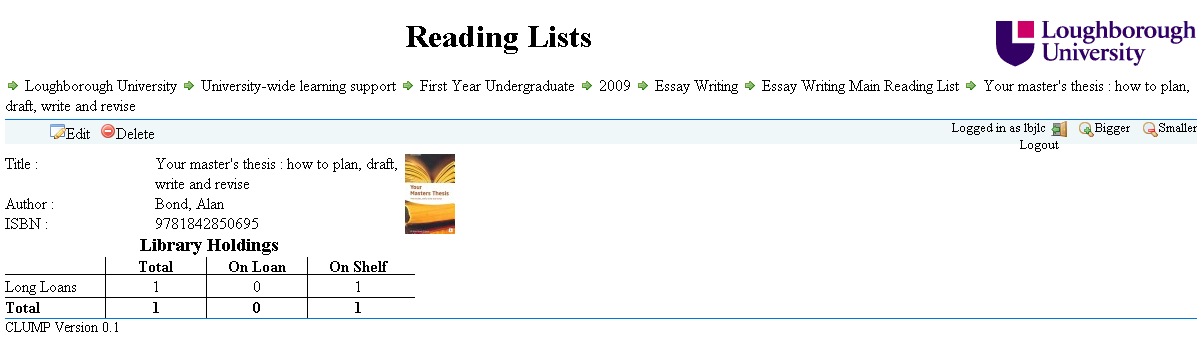
The JavaScript in CLUMP has to make some AJAX requests to Aleph’s X-Server to pull out the information. This required the need for another proxy script to be present on the same host as CLUMP to get around JavaScript’s security model. One advantage of using a proxy is that you can put the username and password for your X-Server account in there and not give it to every user, not that they should be able to access any more information with it than the default X-Server account. Always best to be careful though.
As we are trying to make sure that LORLS isn’t tied specifically to any one LMS the JavaScript used to pull out the current stock status is in a file on its own. This file can be replaced with ones that contain code for getting the same information from other LMS’s.