Loughborough Online Reading List System
Archive for June, 2010
Hello world
25 Jun 2010
by Gary Brewerton
in LORLS
We’ve been developing a new version of LORLS (Loughborough Online Reading List System) for a past few years on and off. As part of this development process we’ve kept a diary of our thoughts, plans, issues and achievements. Up until now we’ve kept this diary private among ourselves, however as we’re now at stage when we can start releasing information about the new version, both internally and externally, we thought it would be a good idea to go public with the diary.
So here it is.
LORLS’s Installer
14 Jun 2010
by Jon Knight
in LUMP
We’re getting to the point with LUMP and CLUMP where Jason and I are thinking about installers. If we were just going to use the code at Loughborough this would be a moot point – we’d just copy the various directories around and tweak under the hood to get the thing to work as we want, just as we have done during development.
However its not going to just be us that use it (or at least hopefully it won’t be!) so we need to think of a nice way for people to install it. The previous versions of LORLS have a Perl command line script that I wrote years ago that asks lots of questions and then does its funky thang. It works, but it could be friendlier, especially for the newbie admins. I’ve also seen a number of PHP based packages that allow you to do most of the installation via a web browser which is rather nice for the new admins, so I thought, “Hey, why not make an installer CGI script that knows very little about the system other than there is Perl there, a MySQL database server is running, the CGI.pm module (which has been part of the Perl distribution since 5.4 so should be there already on most machines installed in the 21st century) and is an executable CGI script?” Why not indeed…
Obviously the prospective LUMP admin needs to install (or have installed for him) Perl, MySQL and a webserver configured to execute CGI scripts in the directory that we tell them to unpack LUMP into, but once that’s done surely we can then check to make sure that all the other modules are present, install them if they aren’t, set up the MySQL database ready for LUMP to use and then configure all the LUMP scripts so that they are ready to go, all with a nice point and drool web interface?
Checking if a Perl module is available is relatively easy, thanks to the eval { } function in Perl. For example, say we want to check if Data::Dumper is installed. That can be done using some code such as:
eval { use Data::Dumper; };
if($@) {
# Module missing
} else {
# Module present, and available for use
}
Shimples!
However things start to get “interesting” if the module isn’t installed. I thought this would be easy, as the Comprehensive Perl Archive Network (CPAN) has a nice module that I’ve used for years to interactively install and update Perl modules with – things like:
perl -MCPAN -e install Data::Dumper
It has a programmatic option as well as an interactive side, so we’re sorted right? Well no, we’re not. Unfortunately the programmatic side really just generates the stream of stuff you see when you run the interactive side. If you include something like:
my $result = CPAN::Shell->install('Data::Dumper');
in your CGI script, eventually you’ll get a result in the web browser of a load of unformated raw text from this command interspersed with your active HTML. The $result variable on the other hand will stay completely empty, with no indication as to whether the installation has worked or not. Pants – not what we want here.
The long and short of it is, to get round this “feature” in CPAN::Shell it seems that you have to do a bit of fork() action. In other words folk off a child process to run the CPAN::Shell method in and then, back in the parent, capture its STDOUT stream into a variable which can then be scanned with a regexp or two looking for signs of success in the output text. Not terribly clean but it works.
There’s another “gotcha” as well: the web server is unlikely to be running as root (or at least it shouldn’t be!) and so the CGI script can’t install Perl modules into the system library directories. This is a more minor pain: you can tell CPAN::Shell that it should do a local installation to a place that the user executing it can write to. So that’s another requirement for running this CGI script: create a directory that’s readable and writable by the user running the web server (usually called something like apache or http) but which isn’t part of the web server document root. In other words, if the web server document root is /var/www/html, we might want to put this LUMP specific CPAN directory tree in /var/ww/LUMPCPAN where it can’t be seen by web browsers. You have to hack up a MyConfig.pm to put in this directory and then point @INC and $ENV{‘PERL5LIBS’} towards it, but that can be done automagically by the CGI installer script once the directory exists.
Now some readers (we do have readers, right?) might be wondering why I don’t use one of the fancy pants CPAN modules such local::libs or Module::Install to do this rather than tackling CPAN::Shell head on. Well its a chicken and egg problem really: I wanted to have the minimum requirements for the installer script to run and, if I’d have asked the user to install a load of libraries and modules to make using CPAN easier I might as well have just given them a list of modules to install. Which actually I have done anyway, just in case they want to install them system wide and/or not trut my installer script to get them right. But nevertheless I’d like to give the newbies (and also folk who have sluggish server admins if they don’t run their own boxes) the option of installing via the CGI installer script. More work for me, but hopefully less for them.
So, its a bit of kludge at the moment but it seems to be the way to go unless anyone else can come up with a better scheme. Once I’m happy it can get the required modules in place, my next trick will be to ask for database server details (database name, username, password, server, port) and then check if the database already exists, or create a fresh one. In the former case I’m also planning on checking the schema in the database against the one in this LUMP distribution and then offer to update it if needs be, and allow fresh databases to either be empty, have some simple test data in them or copy data from another database. Hopefully I can also bolt the importer from older LORLS versions in here so that there’s no command line interaction required at all. With a bit of luck all of those should be alot less hassle than CPAN::Shell has proved to be.
I hope… 🙂
‘Copy To’ Added to CLUMP
10 Jun 2010
I have now added the ‘Copy To’ functionality to CLUMP. It presents a list of the owners reading lists to them with checkboxes and they can select which ones they want to copy the item to. Once they have chosen the lists to copy the item to they click ‘copy’ and it calls LUMP’s CopySU API to copy the structural unit to each reading list selected.
Because the CopySU API can take a while to run at the minute I use the asynchronous aspect of JavaScript to make all the CopySU calls without waiting for the previous one to complete. This lead to the problem of “how do I wait till all the calls have completed?”. There is no “wait till all my callbacks have run” option in JavaScript so I ended up having to increment a counter for each call and then have the callback function decrement the counter. If the counter reaches 0 then the callback function runs the code that we need to run after all of the CopySU API calls have completed (In this case close the popups and reload the current structural unit if it was one of the targets).
Defining Allowed Inline HTML
09 Jun 2010
Jon and I were chatting the other day about a course he had recently attended. It had covered the common types of attacks against web based systems and good practice to defend against them. I was relieved that the results of the course could be summed up my existing knowledge:
Validate your inputs and validate your outputs
Anything coming into the system needs to be validated and anything leaving the system needs to be validated. With the LORLS v6 having a back-end system and multiple front-end systems things are a little more difficult. One front-end system may have a requirement to allow one set of HTML tags while another front-end system needed to not display some of those tags.
This lead us to the conclusion that the the back-end should make sure that it isn’t vulnerable to SQL Injection attacks and the front-ends should make sure it isn’t vulnerable to the XSS style of attacks.
This left me looking at CLUMP and trying to figure out what HTML tags should be allowed. After thinking about it for a while I came to the conclusion that this will need to be configurable as I was bound to miss one that would break an imported reading list. I also realised that, and that it will go deeper than tags, what attributes will each tag allow (we don’t really want to support the onclick type attributes).
The final solution we decided on is based around a configurable white-list. This lets us state which tags are accepted and which are dropped. For those accepted tags we can also define what attributes are allowed and provide a regular expression to validate that attributes value. If there is no regular expression to validate the attribute then the attribute will be allowed but without any value, e.g. the noshade attribute of the hr tag.
Getting the tag part working was easy enough, the problem came when trying to figure out what the attributes for each tag in the metadata were. After initially thinking about regular expressions and splitting strings on spaces and other characters I realized that it would be a lot easier and saner to write a routine to process the tags attributes one character at a time building up attributes and their values. I could then handle those attributes that have strings as values (e.g. alt, title, etc.).
As a test I put in altered an items author to contain
<a onclick=”alert(‘xss’);” href=”javascript:alert(‘xss’);” alt = “google test”>Test</a>
The a tag is currently allowed and the href and alt attributes are also allowed. The alt validation pattern is set to only allow alpha numeric and white-space characters while the href validation pattern requires it to start with http:// or https://. This is how CLUMP generates the a tag for the test entry.
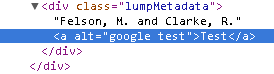
The onclick attribute isn’t valid an so has been dropped, the href attribute didn’t start with http:// or https:// so has also been droped. The alt attribute on the other hand matches the validation pattern and so has been included.
Copying Structural Units
07 Jun 2010
There’s now a new API cgi script – CopySU. This lets you both copy and link SUs to new parents. For example you might want to copy an existing book within the same reading list if there is another volume with very similar details, or you might want to link a single book SU into more than one reading list. In the latter case a change made to the book SU is reflected in all the reading lists it is linked to, irrespective of the list that it was “edited in”.
Jason now has to munge this into CLUMP so that the copy buttons in there run with this new functionality, as at the moment they are just placeholders that generate a new child SU. Seems to work from the command line/by hand so fingers crossed, eh? 🙂